Windows · Windows 10 and 11 (64-bit)
Neveshtar
A lightweight editor for Word files, with proper Persian and right-to-left support; no full Office install.
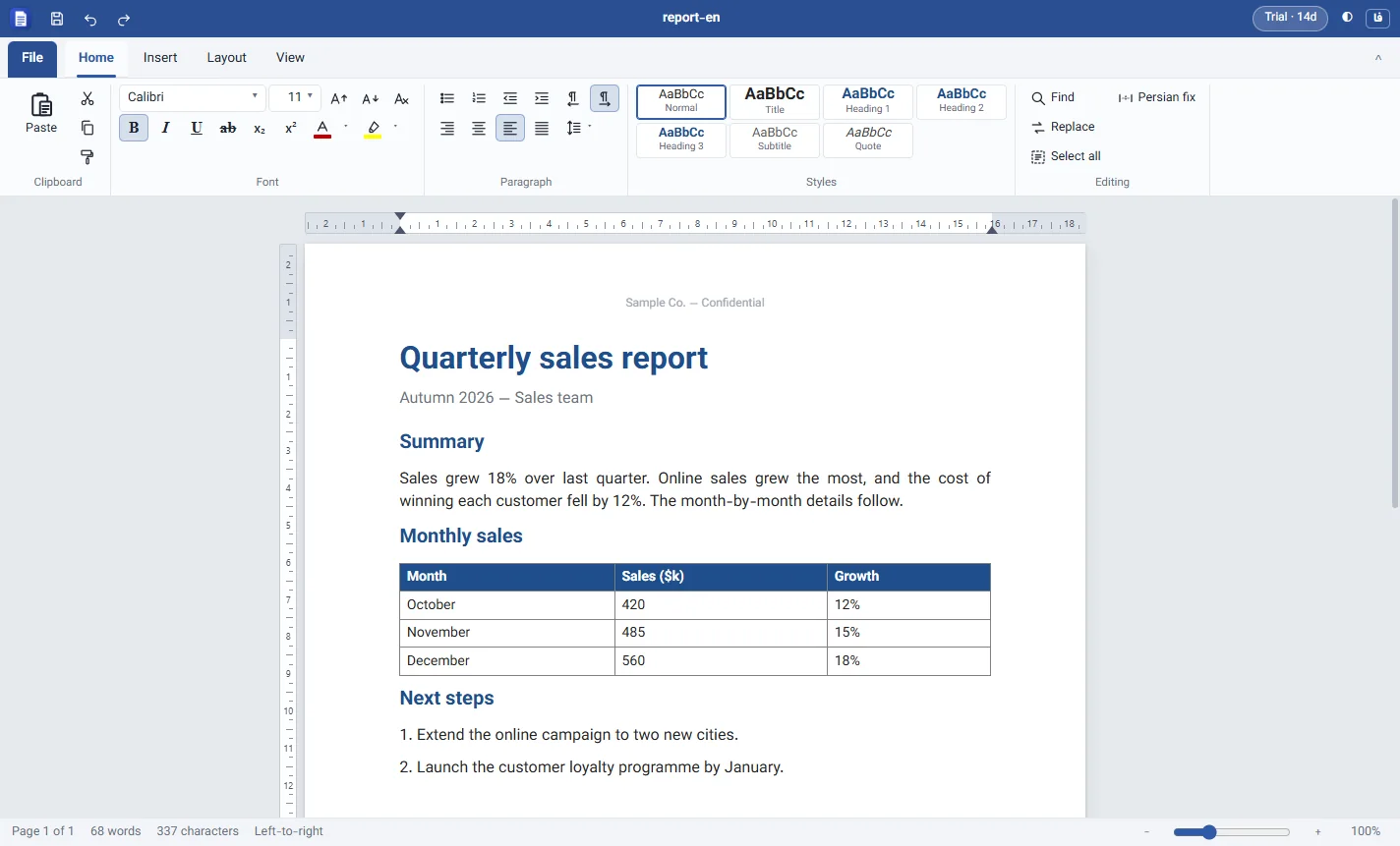
Opens, edits and saves docx files with a Word-like ribbon, tables and pictures, headers and footers with page numbers, rulers, PDF export, and a one-click fix for Persian half-spaces and Arabic letters. For people who only need Word out of the whole Office suite.
900,000 Toman / year · Yearly renewal: 900,000 Toman
Already bought it? Renew your license · Track an order
What it does
- Works on Word files directly Open a docx and save it in the same format; parts the editor does not understand (such as equations and charts) stay in the file untouched.
- Persian and right-to-left Direction per paragraph, Persian digits in page numbers, and Word's Ctrl+Right/Left Shift shortcuts to switch direction.
- One-click Persian fix Fixes missing half-spaces and Arabic ي/ك in the whole document or the selection.
- Headers, footers and page numbers Type or remove headers and footers right on the page; they repeat on every page in print and PDF.
- Rulers and page setup Horizontal and vertical rulers with draggable margins and indents, paper size, orientation and custom margins.
- PDF and printing Export to PDF or print with the same page layout; unsaved work is recovered if the app closes unexpectedly.
Who it is for
For anyone who only needs Word out of the whole Office suite and does not want to install gigabytes of software, especially if they write in Persian.
Familiar from the start
A ribbon with Home, Insert, Layout and View tabs, heading styles and Word's familiar shortcuts; nothing new to learn.
Install and license
Running it on Windows
- The download is a ZIP: extract it first.
- If your browser asks whether to keep the file, choose “Keep”.
- If Windows shows a security warning on the first run, choose “Run”.
The warning appears because the app isn’t signed with a commercial certificate yet. Only download the file from this site.
How the license works
Every feature is free for 14 days. After purchase you get a one-year license key by email, and it activates without internet. A renewal adds a full year to the current expiry date.
Questions
Is it a full replacement for Microsoft Word?
No. It is made for writing and editing letters, reports and resumes. Equations, charts, shapes and text boxes are not shown but stay unchanged in the file, and floating pictures are shown in line with the text.
Does it open old .doc files?
No, only docx. Convert a .doc file once with Word or Google Docs.
What happens when the trial ends?
Opening and reading documents stay free; editing, saving, printing and PDF export need a license.