Windows · Windows 10 and 11 (64-bit)
NetSpeedBar
Download and upload speed next to the Windows clock, with exact data-plan tracking.
Shows your live internet speed on the taskbar next to the clock, keeps daily and monthly usage, warns you before your data plan runs out, and lets you cut any program off the internet with one click.
600,000 Toman / year · Yearly renewal: 600,000 Toman
Already bought it? Renew your license · Track an order
What it does
- Speed next to the clock Download and upload speed always on the taskbar; hover it to see today's and this month's usage. This part is free forever.
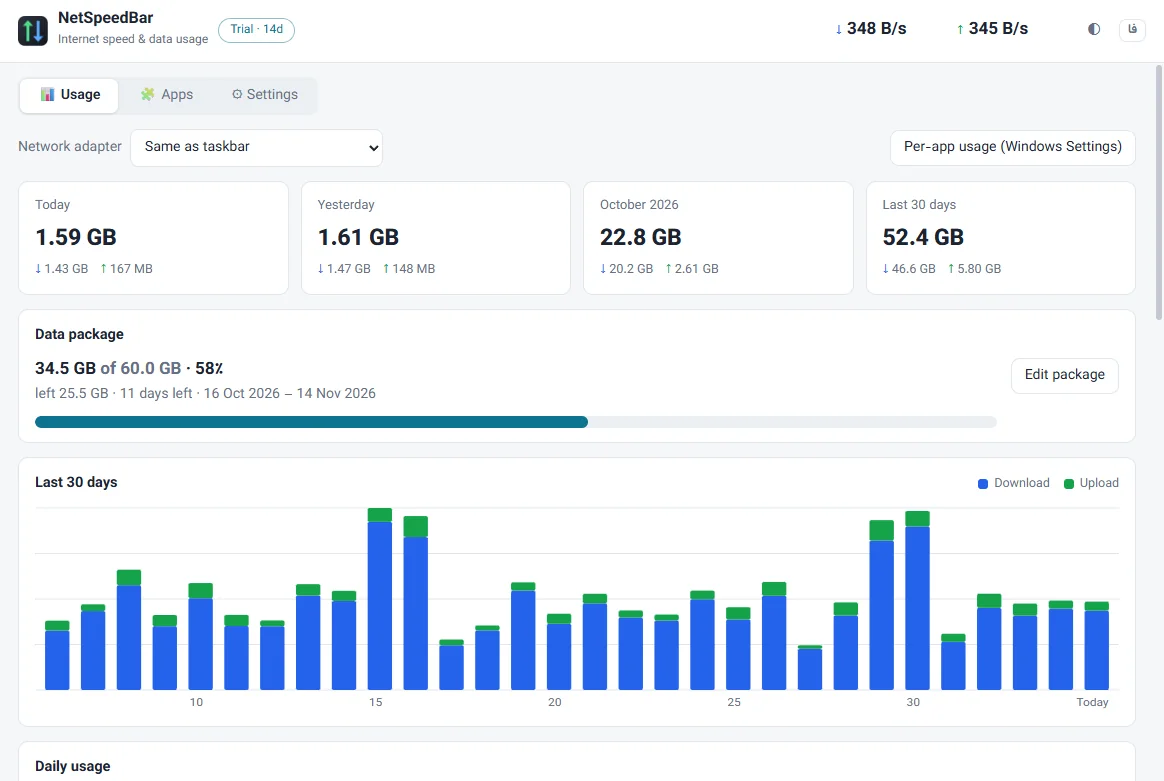
- Data plan warnings Enter your plan's size and length to see what is left and how many days remain, with warnings at 80% and 100%. Monthly plans renew automatically.
- Daily and monthly usage Today, yesterday, this month and the last 30 days, with a download/upload chart per day.
- Block programs See which programs are online right now and block or unblock any of them with Windows' own firewall in one click.
- Per-program speed When it runs as administrator it also shows each program's live speed, like Task Manager.
- All adapters or one Combined Wi-Fi, Ethernet and modem speed, or a single adapter; in bytes or bits.
Who it is for
For anyone on mobile internet or a capped data plan who wants to know the current speed, how much has been used this month, and which program is eating data in the background.
Next to the clock, out of the way
The speed sits in a small strip on the taskbar next to the clock and never covers a window. Move it anywhere along the taskbar.
Install and license
Running it on Windows
- The download is a ZIP: extract it first.
- If your browser asks whether to keep the file, choose “Keep”.
- If Windows shows a security warning on the first run, choose “Run”.
The warning appears because the app isn’t signed with a commercial certificate yet. Only download the file from this site.
How the license works
Every feature is free for 14 days. After purchase you get a one-year license key by email, and it activates without internet. A renewal adds a full year to the current expiry date.
Questions
Where do the usage numbers come from?
From Windows' own per-adapter counters. Usage is counted only while the app runs, so it is best to keep “Start with Windows” on.
How does blocking a program work?
It adds a Windows Firewall rule for that program. If an antivirus manages the firewall and Windows Firewall is off, the app tells you.
What happens when the trial ends?
The taskbar speed stays free forever; usage statistics, the data plan and blocking programs need a license.